Managing financial records manually is one of the biggest challenges for accountants, lenders, finance teams, and business owners.
Most bank statements are delivered as PDF files, which are difficult to edit, analyze, or import into accounting systems. That’s where bank statement converters come in.
A modern bank statement converter helps users extract transaction data from PDF bank statements and transform it into structured, editable formats like Excel or CSV.
Instead of manually typing hundreds of transactions, these tools automate the entire bank statement conversion process using AI and OCR technology.
Today, businesses increasingly rely on digital workflows to process financial documents faster and with fewer errors.
Whether you’re reconciling accounts, reviewing cash flow, preparing taxes, or analyzing transactions, the ability to convert bank statements digitally can save hours of manual work.
This guide explains everything you need to know about bank statement converters, including how they work, who uses them, why they matter, and how modern AI-powered tools are changing financial document processing.
What is a Bank Statement Converter?
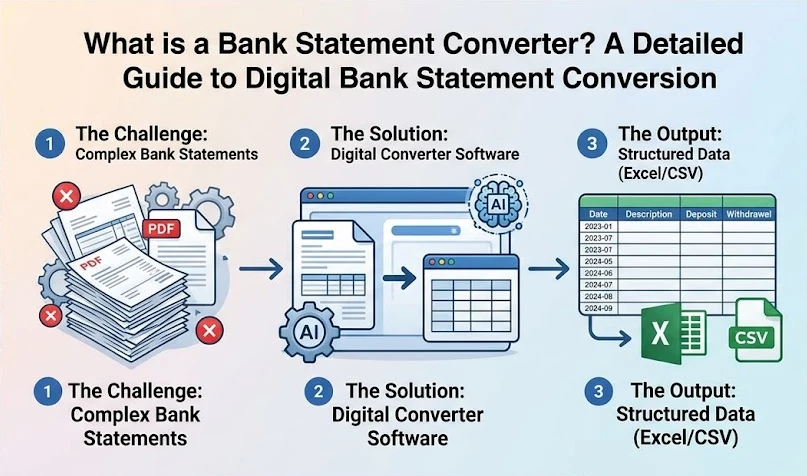
A bank statement converter is a software tool that extracts transaction data from bank statement PDFs and converts it into structured formats such as Excel or CSV.
Instead of copying transactions line by line from a PDF, the software automatically identifies and extracts:
- Transaction dates
- Descriptions
- Deposits
- Withdrawals
- Balances
- Account details
The extracted information can then be used for bookkeeping, financial analysis, reconciliation, auditing, reporting, or importing into accounting systems.
Modern converters use AI-powered OCR (Optical Character Recognition) and intelligent document processing to understand the layouts of bank statements.
This means users no longer need to organize or clean transaction data after manual extraction.
Why Businesses Need Bank Statement Conversion?
PDF bank statements are designed for viewing and sharing, not for editing or analysis.
Without automation, finance teams often spend hours manually entering transactions into spreadsheets or accounting software.
Here’s why businesses increasingly rely on PDF bank statement conversion tools:
Task | Manual Process | Automated Conversion |
Extracting transactions | Time-consuming | Completed in seconds |
Data accuracy | Human errors possible | Consistent extraction |
Multi-page statements | Difficult to manage | Automatically processed |
Formatting | Manual cleanup required | Structured output |
Scanned statements | Hard to read manually | OCR-based extraction |
For companies handling multiple statements every month, automation significantly improves efficiency and accuracy.
How Does a Smart Bank Statement Converter Work?
Smart Bank Statement Converter is a bank-grade, secure platform that uses 256-bit SSL encryption and automatically deletes processed files to protect sensitive financial data. The platform combines advanced OCR technology with AI-based document understanding to accurately extract and organize transaction data from bank statements.
Here’s a simplified breakdown of the process.
Step 1: Upload the Bank Statement
Users upload a bank statement PDF into the platform.
Most modern tools support:
- Digital PDF statements
- Scanned statements
- Image-based statements
- Multi-page documents
Some advanced systems can also process bulk uploads.
Step 2: OCR and Data Detection
The system scans the document and detects transaction tables, balances, and account details.
Unlike traditional OCR tools, newer AI-powered systems understand the structure of financial documents rather than simply recognizing text.
This allows the software to distinguish:
- Headers vs transaction rows
- Deposits vs withdrawals
- Running balances
- Account summaries
Step 3: Bank Statement Data Extraction
Once the document layout is understood, the platform extracts structured financial data.
This typically includes:
Data Type | Information Extracted |
Account Information | Bank name, account holder, statement period |
Transaction Data | Dates, descriptions, amounts |
Summary Data | Opening and closing balances |
Financial Activity | Deposits, withdrawals, transfers |
The extracted data is then formatted into clean tables.
Step 4: Export the Converted Data
After extraction, users can download the converted statement in editable formats such as Excel spreadsheets or CSV files.
This allows businesses to analyze, reconcile, or import the data into accounting systems.
Supported Banks with Smart Bank Statement Converter
Smart Bank Statement Converter works with 1000+ banks, including:
- JP Morgan Chase
- Chase Bank
- FirstBank
- Bank of America
- Atlantic Union Bank
- Citibank
- Wells Fargo
- Barclays
- Scotiabank
- Lloyds Bank
- Abu Dhabi Commercial Bank (ADCB)
- RBC Royal Bank
- Canadian Imperial Bank of Commerce (CIBC)
- American Express (Amex)
Can’t find your bank listed? No problem. Smart Bank Statement Converter uses template-free AI technology that can process virtually any bank statement format, without requiring manual setup or custom templates.
Key Technologies Behind Modern Bank Statement Conversion
OCR Technology
OCR (Optical Character Recognition) converts scanned text into machine-readable data.
This is especially important for scanned bank statements or image-based PDFs.
Without OCR, systems cannot detect transaction details from non-editable documents.
AI-Powered Document Understanding
Basic OCR tools often fail when statement layouts change.
AI-powered systems improve accuracy by understanding the meaning and structure of financial documents instead of relying on fixed templates.
This allows modern tools to work across thousands of different bank formats.
Intelligent Validation
Advanced converters include validation systems that verify extracted data mathematically.
For example:
Opening Balance + Deposits – Withdrawals = Closing Balance
This helps reduce extraction errors and improves reliability.
Who Should Use a Bank Statement Converter?
Bank statement converters are useful for almost any business or professional working with financial data.
Individuals
Individuals often download bank statements for budgeting, tax filing, loan applications, or expense tracking.
A bank statement converter helps individuals:
- Organize personal finances more easily
- Track monthly spending patterns
- Prepare documents for loan or visa applications
- Review income and expenses digitally
Accountants and Bookkeepers
Accounting professionals often process large volumes of client statements.
Automated conversion helps them:
- Reduce manual entry
- Speed up reconciliation
- Organize transaction records
- Prepare reports faster
Mortgage Lenders and Loan Officers
Lenders frequently review bank statements during underwriting.
Automated extraction helps simplify:
- Income verification
- Expense analysis
- Cash flow assessment
- Transaction reviews
Small Business Owners
Business owners use converters to better manage their finances.
Benefits include:
- Expense tracking
- Financial reporting
- Tax preparation
- Cash flow monitoring
Financial Analysts and Auditors
Analysts and auditors often review large financial datasets.
Structured transaction exports make it easier to:
- Analyze spending patterns
- Investigate discrepancies
- Perform due diligence
- Generate reports
Bank Statement Converter vs Manual Data Entry
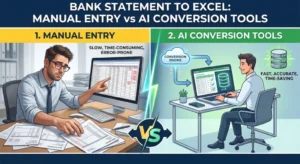
Many businesses still rely on manual copy-paste workflows.
However, manual extraction creates several problems.
Common Problems with Manual Entry
Human Errors
Typos and missing transactions can create accounting discrepancies.
Slow Processing
Large statements may take hours to process manually.
Formatting Problems
PDF tables often break when copied into spreadsheets.
Difficult Scanned Documents
Scanned statements are especially difficult to process manually.
Advantages of Automated Conversion
Modern converters solve these problems by offering:
- Faster processing
- Higher consistency
- Cleaner spreadsheet formatting
- Better handling of scanned PDFs
- Reduced operational workload
How to Convert Bank Statements Digitally
The process is usually straightforward.
Step-by-Step Workflow
1. Upload the Statement
Upload the PDF bank statement into the converter.
2. Automatic Processing
The system extracts and organizes transaction data.
3. Review the Output
Users review the extracted data for accuracy.
4. Download the File
Export the converted statement into Excel or CSV format.
Most modern platforms complete the process within seconds.
Important Features to Look For
Not all bank statement converters offer the same capabilities.
Here are some important features to consider.
Feature | Why It Matters |
OCR Support | Necessary for scanned PDFs |
AI Extraction | Better handling of complex layouts |
Multi-Bank Support | Works across different statement formats |
Batch Processing | Saves time for high-volume workflows |
Security | Protects sensitive financial data |
Export Options | Flexible spreadsheet compatibility |
Some platforms also provide advanced workflow automation and dashboard-based processing to simplify recurring financial tasks.
Is a Bank Statement Converter Safe?
Security is one of the biggest concerns when handling financial documents.
Most professional bank statement conversion platforms use:
- Encrypted uploads
- Secure cloud processing
- Automatic file deletion
- Privacy-focused workflows
Businesses should always verify a platform’s security standards before uploading sensitive financial information.
Conclusion
Manual bank statement processing is no longer practical for modern financial workflows.
AI-powered bank statement converters help businesses automate transaction extraction, reduce errors, and improve efficiency across accounting and financial operations.
As financial document processing becomes increasingly digital, automated extraction tools are becoming essential for businesses of all sizes.
Whether handling bookkeeping, loan underwriting, auditing, or expense analysis, the ability to convert bank statements digitally can dramatically simplify your workflow and improve financial accuracy.
Frequently Asked Questions
What is a bank statement converter?
A bank statement converter is a tool that extracts financial transaction data from PDF bank statements and converts it into editable formats like Excel or CSV.
How does a bank statement converter work?
It uses OCR and AI-based document processing to detect, extract, organize, and export transaction data.
Who should use a bank statement converter?
Accountants, lenders, business owners, auditors, analysts, and finance teams can all benefit from automated statement conversion.
Is a bank statement converter safe?
Most professional platforms use encrypted processing and secure file handling to protect financial data.
What formats can a bank statement converter generate?
Most tools generate Excel spreadsheets or CSV files.